English
 Afrikaans
 Albanian
 Amharic
 Arabic
 Armenian
 Azerbaijani
 Basque
 Belarusian
 Bengali
 Bosnian
 Bulgarian
 Catalan
 Cebuano
 Chichewa
 Chinese (Simplified)
 Chinese (Traditional)
 Corsican
 Croatian
 Czech
Czech Danish
 Dutch
Dutch Esperanto
 Estonian
 Filipino
 Finnish
 French
 Frisian
 Galician
 Georgian
 German
 Greek
Greek Gujarati
 Haitian Creole
 Hausa
Hausa Hawaiian
 Hebrew
 Hindi
Hindi Hmong
Hmong Hungarian
 Icelandic
 Igbo
Igbo Indonesian
 Irish
Irish Italian
 Japanese
 Javanese
 Kannada
 Kazakh
 Khmer
Khmer Korean
 Kurdish (Kurmanji)
 Kyrgyz
 Lao
Lao Latin
Latin Latvian
 Lithuanian
 Luxembourgish
 Macedonian
 Malagasy
 Malay
Malay Malayalam
 Maltese
 Maori
Maori Marathi
 Mongolian
 Myanmar (Burmese)
 Nepali
 Norwegian
 Pashto
 Persian
 Polish
 Portuguese
 Punjabi
 Romanian
 Russian
 Samoan
 Scottish Gaelic
 Serbian
 Sesotho
 Shona
Shona Sindhi
 Sinhala
 Slovak
 Slovenian
 Somali
 Spanish
 Sundanese
 Swahili
 Swedish
 Tajik
Tajik Tamil
Tamil Telugu
 Thai
Thai Turkish
 Ukrainian
 Urdu
Urdu Uzbek
Uzbek Vietnamese
 Welsh
Welsh Xhosa
Xhosa Yiddish
 Yoruba
 Zulu
Zulu


940 nm gets cited with some frequency for both cameras and presence sensors, but that mark does not by itself settle the filter. The camera requires an image that is usable as the light comes back. On the sensor bench, what matters is target response above empty-room. Instead, I would select from those results and not the emitter label.
When it comes to bandwidth, transmission and blocking over a real scene for that device I do the comparison. The spectral signature could appear clean in a laboratory, but the detail may be lost near to an aperture or sensor that sits just below its actuation limit within a housing. A trace may appear correct in spectral form on a bench but then the camera outgasses near a window, or sits too close to the housing trigger threshold.

Write down the device failure before choosing a filter
Quick decision: Set the passband around the emitter and detector overlap, define blocking for a named interference source, then approve the sample in the production cover and housing. Keep the filter’s spectral pass decision separate from the device’s image or sensor pass decision.
Key takeaways
- Start the passband decision with the measured source and detector curves.
- State which interfering light must be blocked, and over which wavelengths.
- Keep separate records for the trace, the part’s fit, and its behavior in the assembled device.
For sample review, I would keep the supplier trace beside a physical inspection record and the assembled-device test. A good optical reading cannot tell us whether the camera image or sensor output passes its own limit.
Start with the complaint in use — a door camera reveals little near a bright window, a presence sensor trips without anybody there or daylight influences an access reader. Take real scene and the actual position of a target. Standardise a pass limit even before the samples arrive as every complaint will require its own specific test.
| Device | Test condition to define | Result to review |
| Door or indoor camera | Dim entryway, then the same target near a bright window | Detail, flare, exposure change |
| Presence sensor | Empty room, then a person at the intended position | Idle output, response size, false trigger |
| Access reader | Intended target at operating distance, with and without daylight or another emitter | Read result under both conditions |
The word “stable” does not settle a sample decision. For the camera, specify the detail that should remain readable. For the sensor, keep an empty-room reading and the response required for presence. Without those figures and scenes, reviewers can reasonably disagree about the same filter.
Sitting between the emitter and detector are the window, adhesive lens and filter. Each interact with the light that reaches the sensor while reflections inside a case can add to light something they designed their work not to capture. Compare data for the parts you have. Where the cover has no measured curve, record that gap and run the sample in the production enclosure.
An infrared bandpass filter transmits light in a desired wavelength region while blocking most other wavelengths instead. Where that region ought to be rests upon the output of the emitter and how well it reacts through the production optical stack from a detector perspective. Where that region needs to lie depends on what the emitter actually produces and how it is perceived by the detector, through the lens of our production optical stack.
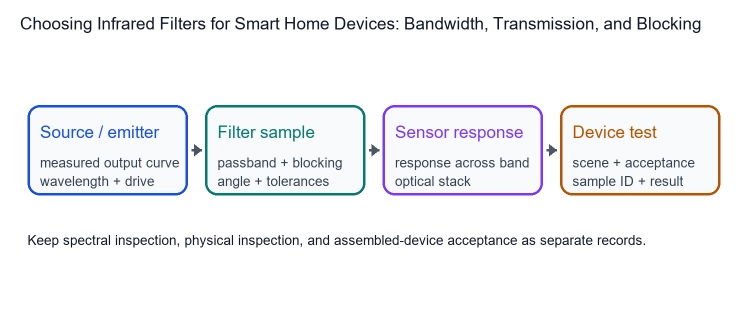
Choose bandwidth around the useful signal
A shared center wavelength and full width at half maximum (FWHM) do not mean two filters will perform alike. Look at the shoulders of their traces. If useful emitter output lies near an edge, one filter may pass materially less of it even though the headline width matches.
FWHM is measured between the two half-peak transmission points. To check edge slope, blocking away from the passband and the lowest transmission within the working band, use the full measured trace. A single width figure cannot show those details.
A narrow band may suppress the known interference, but it can also clip useful signal when installation angle or production variation moves the curve. Widening it buys signal at the cost of more background light. The device test, under the agreed conditions, tells us which tradeoff is acceptable.
Compare the source and detector curves
Request emitter output data at the drive that product will actually use, Now write down the temperature of that measurement point, then find others operating temperatures you should be checking. Compare the curve with detector response before fixing band edges. An “850 nm” or “940 nm” part marking does not show how broadly it emits.
For 850 nm vs. 940 nm comparison, maintain the same housing, drive setting and firmware from trial to trial with no ambient light and target positioned in all trials at precisely the same location (±2 mm). After fixing the emitter choice use measured source curve and see how much you take away with your assembled stack. You have a set of data from an emitter curve choice, if you hold that source curve in place and see how much the measured stack “grabs”.
On the comparison sheet, include center wavelength, FWHM, edge locations, tolerances and minimum in-band transmission. Put actual measurements next to, rather than in place of, drawing limits. Then a failed sample can be distinguished from a limit that needs another design review.
Check transmission across the whole optical path
Peak transmission is one point on the trace. Compare the full useful band with emitter output and detector response, and ask how an average-transmission value was calculated.
Save the trace together with its scan range and incidence angle. For an angled installation, tell the supplier the actual geometry and compare samples on that agreed basis.
Include the production cover and housing. If no cover curve exists, hold the module setup fixed and swap only the filter. If transmission does not explain a loss, request reflection and absorption data under the same conditions. NIST’s spectrophotometry traceability work gives measurement context.
Compare those coupon results with the assembled-device test; the measurements help explain a loss but do not replace the device check.
Use separate columns for the drawing limit, actual trace and device result. A filter may pass its optical specification and still fail after assembly because of the cover, alignment or a reflective internal surface. That distinction tells the team whether to inspect assembly, revisit the scene or reconsider the optical limit.
Set blocking limits for the light the device must reject
Start the blocking requirement with the unwanted source, whether daylight, a display, another emitter or a reflection inside the housing. The drawing should then give the wavelength interval and required limit for that problem.
An optical density (OD) number needs its wavelength interval, scan range, angle and measurement conditions beside it. Check the instrument floor when transmission is extremely low; below that point, reported differences may not be meaningful.
Optical density (OD) describes blocking on a logarithmic scale: as OD rises, transmitted light falls. A useful requirement names the wavelength interval and the measurement floor as well as the OD value. NIST’s spectrophotometry overview gives measurement context; the device team sets the rejection limit from its own interference test.
Try to recreate the troublesome light in the assembled device. For a camera, collect frames with that source both on and off; flare and exposure shifts should be visible in the record. For a sensor, log the idle output and any false triggers with the production housing fitted.
Keep filter approval separate from product approval
A spectral report shows whether the sample meets its drawing; the device test checks image quality or false-trigger behavior. Link both decisions to the sample ID.
Before assembly, check thickness, outline, effective optical aperture, and specified surface condition. Change only the filter during the product test. Save camera frames or sensor baseline and response against the team’s actual limit.
| Decision | Evidence | Device check |
| Is the intended signal being clipped? | Emitter curve against the measured filter trace | Image or sensor response in the target scene |
| Is an outside source causing a problem? | Blocking interval and measured transmission floor | Repeat the same test with the source on and off |
| Does installed angle reduce margin? | Angle-specific trace and production tolerance | Repeat with production cover and housing |
Keep the drawing limit fixed during sample review. If it needs to change, revise the specification and repeat approval.
Turn the approved sample into an incoming-inspection rule
The purchase specification should carry the approved center, FWHM, in-band transmission, blocking interval, scan range, angle and dimensions. Ask incoming reports to identify each lot and follow the same test basis. Decide how to handle a borderline reading before one turns up.
Keep the approved curve with the drawing and sample ID. Ask whether a change in coating, production location, or measurement method requires a new camera check.
Before assembly, inspect the dimensions, surface and effective optical aperture. A nonstandard outline needs its drawing sent with the optical limits; otherwise a satisfactory coating may be reviewed on the wrong physical shape.
Tie each lot’s label to its trace and physical inspection; retain the baseline scan range, angle, dimensions, and limits.
Send emitter and detector curves, optical drawing, cover data, and acceptance scene with the request. Ask for the sample ID, trace, scan range, angle, and conditions.
For example, if a door camera loses detail beside a bright window, hold target and exposure fixed while switching that source on and off.
Discuss smart-home filter requirements with BoDian Optical
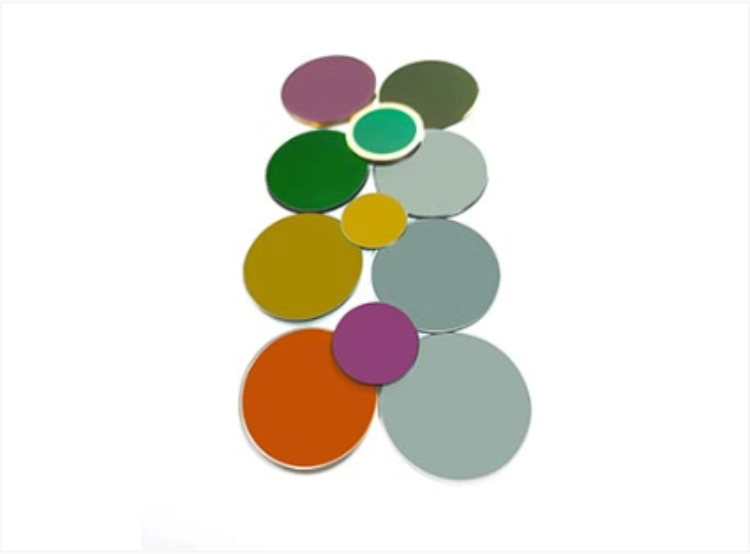
The infrared filter range includes narrowband, broadband, long-pass, short-pass, and anti-reflection filters. Start with the signal the device needs to keep and the source it needs to reject, then choose a filter type for that job. BoDian Optical can customize filter shape and size to a drawing; provide the outline and clear aperture along with the optical requirements.
For sample review, request the transmission curve and compare reflection or absorption if the loss remains unexplained. Check dimensions, surface condition, and effective optical aperture against the drawing. Then test the assembled device under its stated scene and acceptance limit.
Send BoDian Optical the planned test scene and acceptance limit with the source and detector data. Read About us or use the contact page to send the drawing and test conditions. NIST’s spectrophotometry overview gives measurement context; the product team sets the pass/fail rule.